
In the US starting in 2003, amateurs have had a secondary allocation of five specific channels in the 60 meter band. Unlike most other allocations, these are restricted to phone emissions in upper sideband, with a maximum of 50 watts PEP. Recent HF rigs have enabled use of these channels by taking steps to ensure than an unsuspecting operator does not accidentally transmit elsewhere in the band, or with anything other than upper sideband. Yaesu did this in their FT-8x7ND rigs by pre-programming special channels into the memory and restricting transmission on 60 meters except while on one of those memories. Recently, the FCC changed the grant to loosen the restrictions a bit and replaced one of the channels with a different one to avoid interference. These new rules become effective in March 2012, but they leave existing (unmodified) radios with an outdated channel set.
In February 2012, CHIRP gained support for programming the Yaesu FT-8×7 family of radios, thanks to efforts by Marco IZ3GME. In examining the memory image of the current 60-meter-capable FT-817ND radio, it’s apparent that the new channels (which the -ND models added over the originals) are simply tacked onto the end. This means that CHIRP can modify this region, allowing the user to update channel M-603 with the newly-granted frequency.
To do this to your radio, you first need a suitably recent build of CHIRP, equal to or later than build 02112012, which you can obtain from the daily build repository. The following instructions are for the FT-817ND, the procedure with CHIRP is the same for the other radios.
Place your radio into clone mode by holding down the two mode keys on top of the display while powering on. Next, download an image of the radio, by going to Radio -> Download from Radio. Choose Yaesu, FT-817ND (US Version), the appropriate serial port, and then click OK. Once the clone progress dialog box appears, initiate the clone from the radio by pressing the A button below the display.
After the image download completes, you should see CHIRP’s tabular display of your radios memories. At the top, select “Special Channels” to display the M-60x memories:
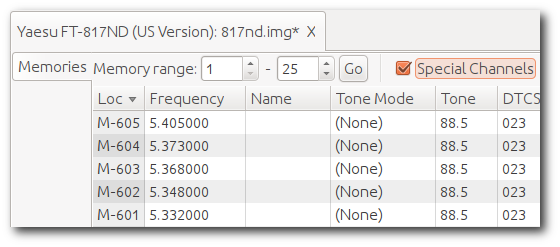
Memory M-603 needs to change from 5.368MHz to 5.3585MHz (note these are center frequencies, not the normal dial/carrier frequencies you may be used to). Click in the frequency field for memory M-603 and make the change:
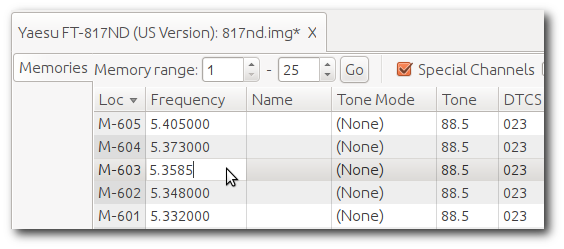
Hit enter to finish editing the frequency. Now you can upload the image back to the radio. Do this by going to Radio -> Upload to Radio. The serial port you used before should be in the box and the other settings are implied. Before you click OK, press the C button on the radio to prepare it to receive the image (assuming you left it on and in clone mode while making the frequency change). After the upload is complete, restart the radio and verify that memory channel M-603 has been updated.
Yaesu has reportedly announced that they do not intend to provide an official update to the radios, although it is unclear if newly-manufactured devices will have the updated channel data. Regardless, for the time being CHIRP is (as far as I know) the only way to “fix” your radio!
Can’t get my FT-897D to work on todays CHIRP. 897 works fine on the RT Systems commercial software. Do you have the “A” and “C” button instructions reversed? On the radio A is receive from software and C is send to the software.
The A and C buttons are correct for my 817, but may be different for the 897.
Did it work before or is this the first time you’re trying? What driver are you choosing and what behavior are you seeing?
If you’re willing to join the chirp_users mailing list, it would be easier/better to discuss there.
Thanks!
Just joined the list. Today’s build and the 02112012 build in your Update your FT-817… instructions will not communicate with my 897D. Send to radio errors out and receive from software just sits there and does nothing.
Okay, well, post a comment on the list about this and we’ll get to discussing it
Thanks!
From what Yaesu Tech Support has to say memory positions M601 to M605
cannot be unlocked for modification.
What’s your point? OEMs say all kinds of things to explain what they do and don’t support. I think the scores of users who have successfully altered the frequency of their M-603 channel would argue that it is indeed possible to do the modification
Cloned in new 603 freq on a new FT857D……..
On Win XP ( had to find out and type in COM11 for my USB-62 B…
Worked very smooth!! Thanks Dan, Keep it up on the FT857D !!!!!!
Used chirp-daily-03032012-win32
I used CHIRP to change the 60m memories on my FT-817ND and FT-897D yesterday. It went well. One of the rigs was confused after the update; after powering it off and on again it was fine. The 897’s clone mode RCV and SEND buttons are indeed reversed from the 817. Fortunately, the 897 labels them in the LCD display.
In addition to the M-603 frequency change, I set all five of my 817’s memories to DIG mode. Interestingly, DIG mode needed the suppressed carrier frequency instead of the channel center frequency. It was necessary to lower the frequencies 1500 Hz to get them to work properly for PSK-31. My 817’s 60m memories are now 5.3305, 5.3465, 5.3570, 5.3715 and 5.4035 MHz and DIG mode. I choose 1500 Hz on the PSK-31 waterfall to get to the center of the channel.
I also tried CW mode. It worked with the original center frequency settings.
Thanks for providing the tool.
73 de Lou K0ANS
I had a little trouble doing this but after a while I got it! I had to go into the RT systems program for the 817 to change the freq. name to read 5.357.0. All seems OK . I’ll have to check it to make sure it’s on frequency.
Just updated M-603 using this software. Worked just as described.
I downloaded the build dated 3/28/2012 and installed it.
FT-897D is not listed as a valid model for Yaesu.
Is the 897 no longer supported?
Mike P
N4MEP
Use the 857 driver for the 897, as they appear to be the same.
Thanks. That worked.
M603 is now set to 5.3585 on the FT-897D.
This worked as advertised, great instructions.
I downloaded th March download and when I retreive the radio data it downloads fine. I change 603 to 3.3585 and hit enter and an error message of incomplete flag or something like that andd it will not change 603. I also tried using 817,857 but same thing, I am trying to load an FT897 radio. PLEASE HELP!!!!!!!
I recommend you download the latest daily version and try that:
http://trac.chirp.danplanet.com/chirp_daily
If that does not work, please either file an issue on the chirp website or report it to the mailing list.
Bruce
I just did my 897D.
I dumped the newest build program 03/30/2012 and loaded 03/03/2012 from daily builds. It allowed the change to go thru.
Correction: The version I dumped was todays 03/31/2012-not 03/30/2012.
Then picked 03/03/2012 as per Dave Koller, who sait it worked for him.
Could not alter the M03 data.
Made the change in the listed frequency but got error “invalid data”!
Dumped the program and loaded Build 03/03/2012, as per Dave Koller, and it worked!
Thanks for the Way!!!
I had to use CHIRPS 03032012 the frequency of 5.35850 went it but it’s wrong because it actually transmits on 5.3570.0. The frequency that has to be entered is 5.36000 but the program won’t take it!
Sorry Dan you were right about the frequency I was wrong I messed upand 5.3585 is correct.
Dan
As Chirp is set to 154 mhz ceiling on the FT-857D ,I can’t bring in the Marine frequencies. I could not find the reason for the 154 in searching or did it just slip by my feeble mind?
I can program them in by hand – but it would be nice from the stock config file..
Thanks again for all your hard work and most of all for the time and effort!!
If this isn’t right, please file an issue on the website and include details of which model you have exactly and I’ll get it fixed.
Thanks!
Just a followup on the blog… Thank you all. CHIRP loaded all the marine frequencies in one swoop… FT-857D now takes up to 164 MHz.. You guys are awesome — and on the ball!!
Just changed out the M-603 on my FT-897D using the 20120428 daily build on an Ubuntu 12.04 machine. Using the directions above it worked as advertised. This was my first exposure to CHIRP, and I am very impressed. A ham friend and I were talking a couple weeks ago and we both commented it would be a great idea to develop radio programming software that was radio & OS agnostic. CHIRP fits the bill perfectly. Thanks for a great piece of software!
Will this work for the older (pre-ND) 817 models>
The non-ND 817 doesn’t have the special locked-down 60m channels, so there is nothing to “fix”. However, if you have (hard or soft) modded your 817, then CHIRP will let you add the 60m frequencies to regular memory channels.
I have a 897 NonD can you point me in the right direction to Add 60 meter capability?
Thanks, Kevin
I think you’ll need to hard-mod the radio (i.e. open it up to transmit anywhere) and then you can use chirp to program in the 60-meter frequencies. I don’t have one, so it would be best to ask on the CHIRP mailing list.
Was able to change 60m Channel 3 to the new frequency yesterday. Used Windows Vista and the CT-62 USB cable with the Prolific chipset. The only two problem I had was that I had to disconnect all other USB devices and force the CT-62 cable to use COM3 because CHIRP would not list COM16, which Vista initially assigned it. The other problem was a cockpit error, I selected FT-817 instead of FT-817ND and that caused a checksum error. Other than that, follow the above precedure and it will work for you too! I checked it out using another HF rig with the new CH3 and is was right on frequency. Thanks for the program and procedure.
73,
Steve
Please read the documentation on the website. CHIRP can talk to any COM port you want.
Will the soft be extended to work with my FT-950? I like te software. Gives easy access to my radios. 73s..
I’d be glad to, but someone will have to loan me one to be reverse-engineered.
alas, chirp is broken on Apple OS X (my sys, 10.5. as of 02-14-2012, the last daily build that will run with the R6 Python kk7ds distribution…
the R10 Python runtime appears to be missing an entire directory of files, and the executable shell script references the directory (2.7 under …/Versions) that is missing!
i like chirp a lot and am grateful for the features i can use up to 2/14/12 – i hope that this problem is remedied soon – kudos to the programmers working on this project!
73,
billy ball, kg4zqz
This has been discussed at length in other places. The problem is with Apple’s package installer. The bits are not missing from the package, apple’s installer is just not properly overwriting the old version of the package. Remove the old one from your system and the new one will install without any problem
i tried using the directions at:
http://chirp.danplanet.com/issues/153
and using:
sudo rm -Rf /opt/kk7ds
to completely remove /opt/kk7ds, and subsequently installing R10 using the file at:
http://www.d-rats.com/download/OSX_Runtime/KK7DS_Python_Runtime_R10.pkg
this results in empty directories under:
/opt/kk7ds/Library/Frameworks
the requisite directories/files are simply not there at all… mystifying!
i’d be interested in the requisite terminal incantation to force a proper package install!
73,
bill, kg4zqz
update:
dan, indeed the populated 2.7 directory is in the R10 package! my workaround (in the absence of a proper removal incantation) was to use Pacifist app to extract the 2.7 directory from the R10 package (/opt/kk7ds/Library/Frameworks/Python.framework/Versions/2.7) and copy into the proper place using mv … so now the latest chirp-0.2.2.app runs!
thanks for all your work on this project – it is defintely appreciated!
73,
bill, kg4zqz
“Failed to communicate with radio: Unable to read block 00 expected 4 got 1”
I have one of the very newest FT-817ND (US) units, one of the ones that they *just* shipped this month (mid May 2012) after Yaesu had trouble sourcing some parts and then finding some and making them work.
I have the stock RT Systems USB to serial cable (USB-62B) set to COM3 and it works with the ADMS version 4.50.08.
Sure enough, the ADMS software shows you the 60 meter channels at the bottom of the memory listing as channels 601-605, but they are shaded in red, which apparently in ADMS means read-only.
I installed CHIRP daily-20120517 and when I try to download from the radio, get the message that shows at the top.
The latest FT-817ND (US) still has the wrong frequency preloaded in location 603, so I’m looking for a way to update it. ADMS seems to use some either binary or bcd format for frequencies. Maybe I can hack the data file that way. Anyway, I thought I’d let you know what I have found so far.
The RT Systems supplied ADMS USB-Serial cable is set for 38,400 baud with 8 data bits, 1 stop bit, no parity, and no flow control handshaking. Does it need to be preset to something else for the FT-817ND with CHIRP? Running Vista 32 with all current updates.
Thanks again.
Sincerely,
Jack – AK4UV
The RTSystems cables are usually broken by design for other software packages. However, try setting the CAT rate in the radio to 9600. CHIRP opens the port at this speed and the default values (which are only applicable to DOS programs) are ignored. If you have other trouble, please file a bug on the website and avoid reporting issues on my blog here. Thanks.
…and no sooner did I post this than I downloaded today’s daily build which downloaded from the radio without a problem!
Jack – AK4UV
*AND* CHIRP wrote the changes back to the FT-817ND perfectly. Thank you for letting me fix the out of date 60 meter frequency!!!!!!!!!!
Jack – AK4UV
Any planes for an Android tablet version? My Acer A500 has a host USB port, and attaching a generic USB-to-RS232 cable to it, is supported in the OS.
ps: On a Yaesu FT-897D (and presumably similar models), attaching names to the special memories M-601 thru M-605 is easily done via the radio’s dials, so probably Chirp should support that as well.
Dan, I wanted to take a moment to thank you and everyone that works with you to maintain such a useful tool, and your patience and willingness to support the users. Thanks to all the collective and specifically Filippi Marco’s efforts, I just updated my FT-817ND to the new 60M channel where Yaesu had just abandoned it’s customers. I also updated 60M in the FT-897D I’m selling so that the guy getting it doesn’t have to figure out how to do it. I think that made him happy. Thanks again!
Thanks Grant! Marco deserves most of the credit for writing the drivers themselves, although I did the 60m part (since he’s not in the US and doesn’t have those in his radio). I’m glad we were able to provide a solution for the Yaesu users out there. Score another for open source!
I modded my 857D and it worked FB.
For those guys who were getting the invalid error when changing the M-603 freq, you have to enter the entire frequency with the last trailing zero’s for it to take the change. I had a hard time before I entered the complete frequency and it worked like a champ.
Great program!!!
Bill K4FX
If you have trouble with CHIRP or this process, please do not post a comment here asking for help. Please email the CHIRP users mailing list for procedural help, or file a bug on the CHIRP website’s issue tracker if you believe something is wrong.
Thanks!
I have a fairly new FT-897D, and mine is correct! It appears that Yaesu has fixed this. Production date on my radio (based on serial number) is February 2012.
– Bill
Downloaded CHIRP and had it updating my 857D within minutes. The process for updating 60 meters was flawless. Outstanding application!
Re the PSK31 solution provided by Lou K0ANS above, would it be possible to use CHIRP to have *ten* 60M memory channels on my FT897D?
Ml-01 5.3320 USB
Ml-02 5.3480 USB
Ml-03 5.3585 USB
Ml-04 5.3730 USB
Ml-05 5.4050 USB
Ml-06 5.3305 DIG
Ml-07 5.3465 DIG
Ml-08 5.3570 DIG
Ml-09 5.3715 DIG
Ml-10 5.4035 DIG
Channels above are M601 through M610 if unpartitioned.
Thanks
73
Kim
KD9XB
i just downloaded the dump from my hardware freeband 6L18xxxx uk bought 817ND and the memories only show 1-200 on chirp 0.2.2
is this normal after the hw mod? can i get access to the extra memories for other use?
yep its the same with the daily build, but now i have all the vfo states and the 200. maybe its the hw mod i did.
great software, nice clean layout. im using xp on a friends pc, i cant get the lucid binary to run on puppy lucid 528, and i will try a compile but i expect lots of missing libs.
wont run under wine!
maybe release a puppy .pet of .sfs? pleeeese!
Hi all,
Please direct bugs to the chirp website bug tracker here. To discuss features or ask questions about how to use CHIRP, please join and post to the mailing list.
Thanks!